
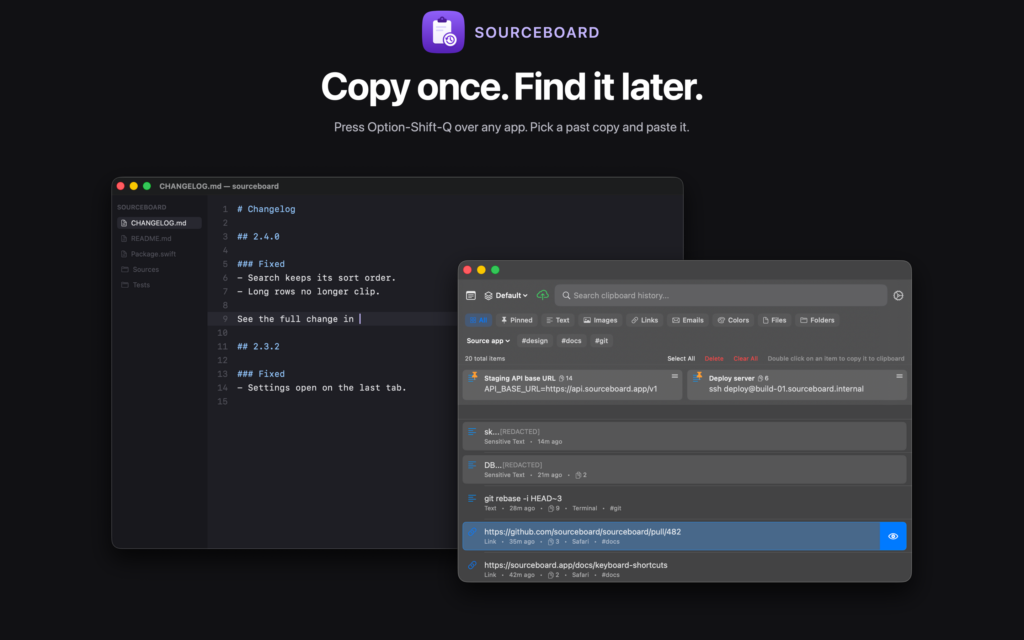
Your Mac keeps one clip. SourceBoard is a clipboard manager for Mac that saves text, images, links, emails, colors, and files.
Press Option-Shift-Q from anywhere. Search, pin, and paste.
Who it is for
Clipboard history for the work you already do
Pin, search, and paste without leaving the keyboard. iCloud sync requires a subscription.
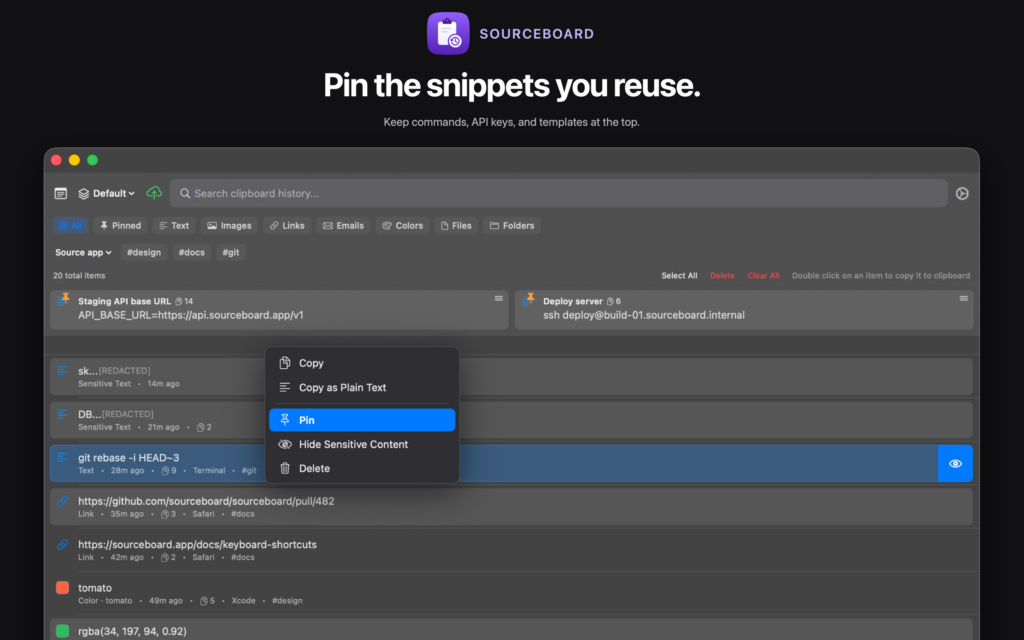
Developers
Pin API keys, commands, and templates. Search history when you need a snippet again.
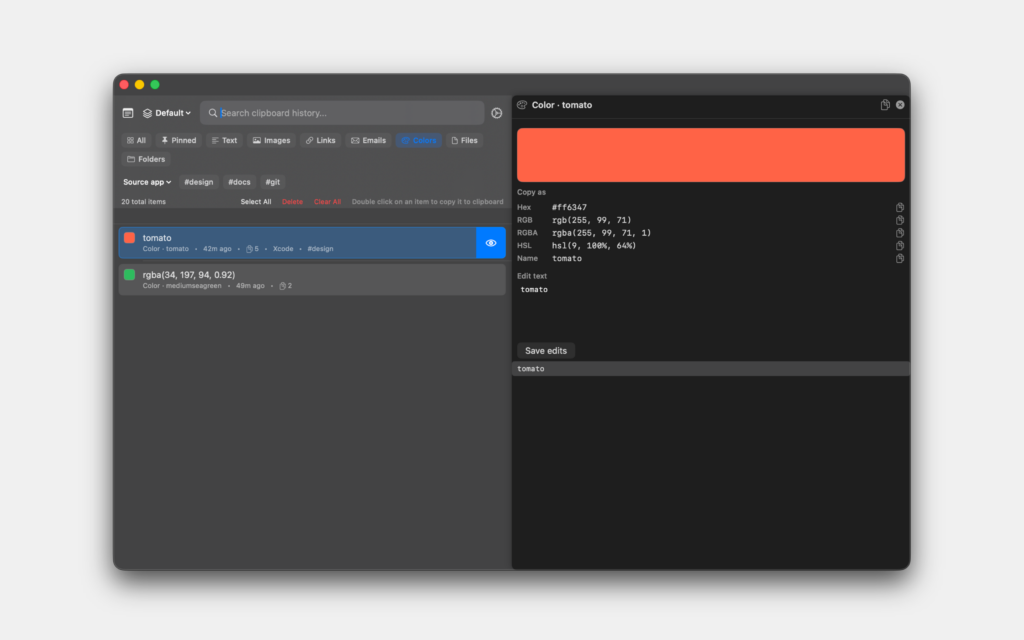
Designers
Copied colors show a swatch. Copy as hex, rgb(), rgba(), HSL, or the CSS name.
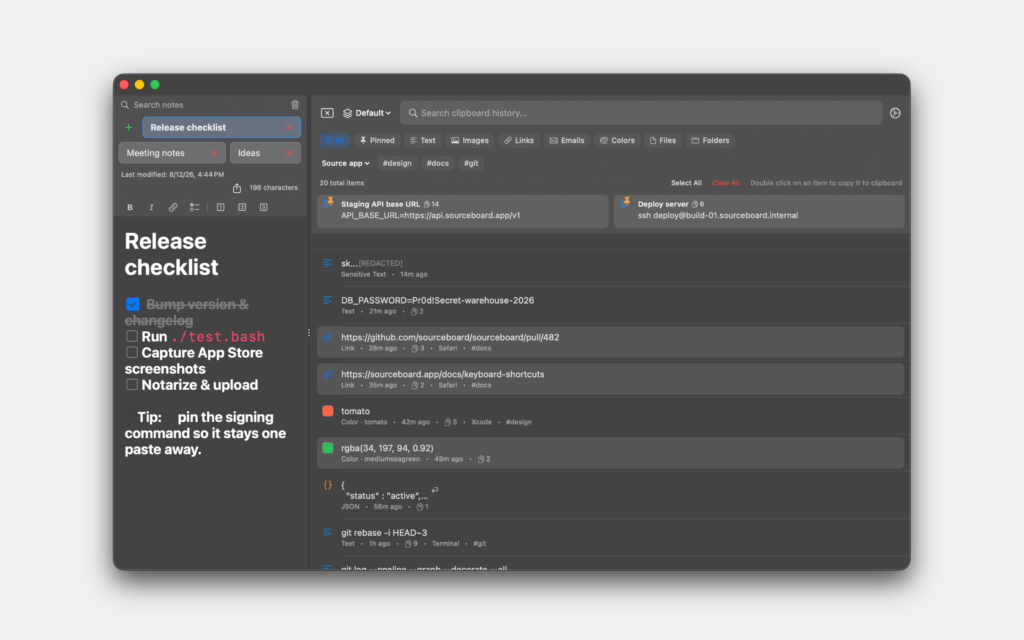
Writers
Keep quotes, links, and a live markdown notepad beside your history.
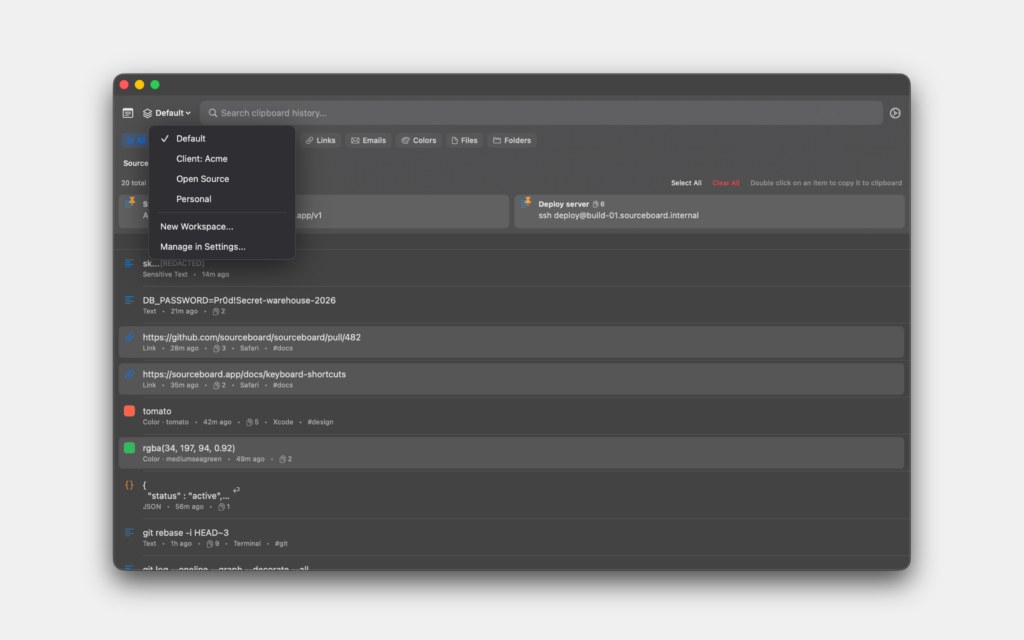
Projects
Give each project its own clipboard history and notes.
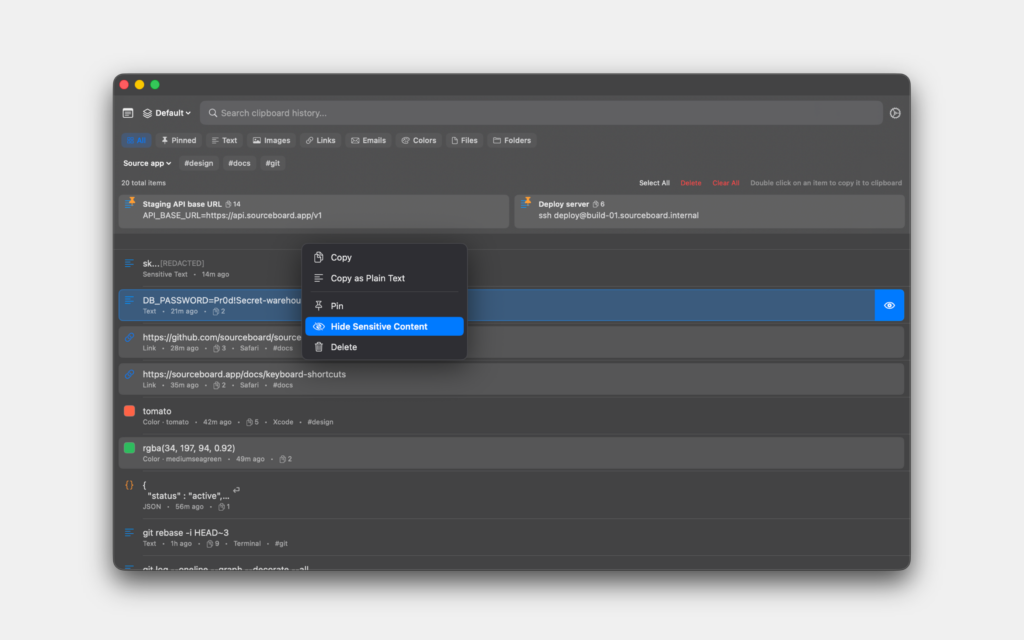
Privacy
Hide private items. Ignore apps. History stays on your Mac, encrypted at rest.
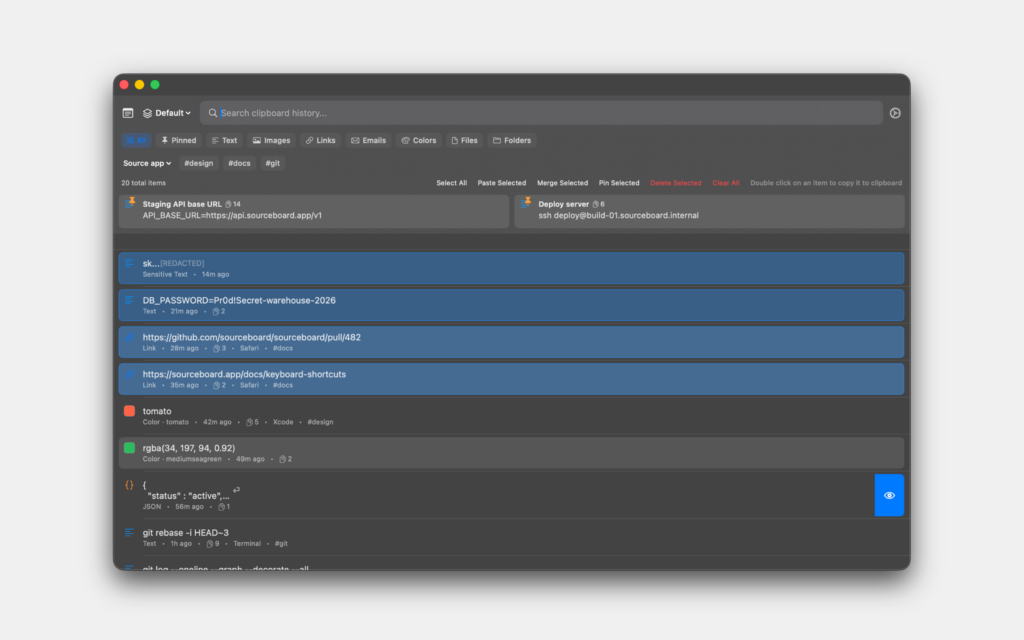
Power users
Select many items. Merge, pin, or paste in one pass. Command palette is Cmd+K.
Need steps? See the How-To Guides.
Getting started
- Download SourceBoard from the Mac App Store℠ and start the free trial.
- Set your hotkey in Settings.
- Copy as usual, then open your clipboard history Mac list when you need it.
- Continue for $5.99/year to keep using the app and unlock iCloud sync.
After setup, it stays out of the way until you call it. So you get clipboard history Mac whenever you need it.

Mac® and Mac App Store℠ are trademarks of Apple Inc. Apple and the Apple logo are trademarks of Apple Inc., registered in the U.S. and other countries. App Store is a service mark of Apple Inc.
Legal
EULA — We use Apple’s standard EULA: https://www.apple.com/legal/internet-services/itunes/dev/stdeula/
Privacy Policy
Sourceboard is a product of ONLYHUMN LLC. We are a team that wants to return technology to be in service of humans and bettering our lives, not consuming our precious time and attention.
We do not collect any of your personal data for our website to function.
What we collect in the App
SourceBoard stores your clipboard history and notes on your Mac (and in iCloud Sync when you have a paid subscription). That content is not sent to our analytics systems.
We collect anonymous product analytics (app installs, opens, trial and subscription events) and a random device identifier via Google Analytics. We use this for product analytics and advertising measurement. We do not send clipboard contents, notes, your name, or your Apple ID to Google Analytics.
Core app features work locally; analytics requires a network request to Google.
However, despite our safeguards and efforts to protect your data, no electronic transmission on the Internet or storage technology (database) can be 100% secure. We can’t promise or guarantee that hackers, cybercriminals or other unauthorized third parties will not be able to breach our security and unlawfully collect, access, steal or alter your data. We will do our absolute best to protect your information. You use sourceboard at your own risk. Do not use the app on insecure networks and devices.
Questions or comments? Contact us at [email protected].
Last Updated: 07/11/26
Terms and Conditions
Last updated: 04/03/2024
Please read these terms and conditions carefully before using the Service (Sourceboard).
Interpretation and Definitions
Interpretation
The words of which the initial letter is capitalized have meanings defined under the following conditions. The following definitions shall have the same meaning regardless of whether they appear in singular or in plural.
Definitions
For the purposes of these Terms and Conditions:
- Application means the software program provided by the Company downloaded by You on any electronic device, named Sourceboard
- Application Store means the digital distribution service operated and developed by Apple Inc. (Apple App Store) in which the Application has been downloaded.
- Affiliate means an entity that controls, is controlled by or is under common control with a party, where “control” means ownership of 50% or more of the shares, equity interest or other securities entitled to vote for election of directors or other managing authority.
- Account means a unique account created for You to access our Service or parts of our Service.
- Country refers to: Delaware, United States
- Company (referred to as either “the Company”, “We”, “Us” or “Our” in this Agreement) refers to ONLYHUMN LLC, 1007 N Orange St. 4th Floor Suite #5984, Wilmington, Delaware 19801, United States.
- Device means any device that can access the Service such as a computer, a cellphone or a digital tablet.
- Feedback means feedback, innovations or suggestions sent by You regarding the attributes, performance or features of our Service.
- Free Trial refers to a limited period of time that may be free when purchasing a Subscription.
- Service refers to the Application.
- Subscriptions refer to the services or access to the Service offered on a subscription basis by the Company to You.
- Terms and Conditions (also referred as “Terms”) mean these Terms and Conditions that form the entire agreement between You and the Company regarding the use of the Service.
- Third-party Social Media Service means any services or content (including data, information, products or services) provided by a third-party that may be displayed, included or made available by the Service.
- You means the individual accessing or using the Service, or the company, or other legal entity on behalf of which such individual is accessing or using the Service, as applicable.
Acknowledgment
These are the Terms and Conditions governing the use of this Service and the agreement that operates between You and the Company. These Terms and Conditions set out the rights and obligations of all users regarding the use of the Service.
Your access to and use of the Service is conditioned on Your acceptance of and compliance with these Terms and Conditions. These Terms and Conditions apply to all visitors, users and others who access or use the Service.
By accessing or using the Service You agree to be bound by these Terms and Conditions. If You disagree with any part of these Terms and Conditions then You may not access the Service.
You represent that you are over the age of 18. The Company does not permit those under 18 to use the Service.
Your access to and use of the Service is also conditioned on Your acceptance of and compliance with the Privacy Policy of the Company. Our Privacy Policy describes Our policies and procedures on the collection, use and disclosure of Your personal information when You use the Application or the Website and tells You about Your privacy rights and how the law protects You. Please read Our Privacy Policy carefully before using Our Service.
Subscriptions
Subscription period
The Service or some parts of the Service are available only with a paid Subscription. You will be billed in advance on a recurring and periodic basis (such as daily, weekly, monthly or annually), depending on the type of Subscription plan you select when purchasing the Subscription.
At the end of each period, Your Subscription will automatically renew under the exact same conditions unless You cancel it or the Company cancels it.
Subscription cancellations
You may cancel Your Subscription renewal either through the App/App Store or by contacting the Company.
You will not receive a refund for the fees You already paid for Your current Subscription period and You will be able to access the Service until the end of Your current Subscription period.
Billing
You shall provide the Company with accurate and complete billing information including full name, address, state, zip code, telephone number, and a valid payment method information. If purchased through the App Store, this happens automatically.
Should automatic billing fail to occur for any reason, the Company, or App Store, will issue an electronic invoice indicating that you must proceed manually, within a certain deadline date, with the full payment corresponding to the billing period as indicated on the invoice.
Fee Changes
The Company, in its sole discretion and at any time, may modify the Subscription fees. Any Subscription fee change will become effective at the end of the then-current Subscription period.
The Company will attempt to provide You with reasonable prior notice of any change in Subscription fees to give You an opportunity to terminate Your Subscription before such change becomes effective.
Your continued use of the Service after the Subscription fee change comes into effect constitutes Your agreement to pay the modified Subscription fee amount.
Refunds
Except when required by law, paid Subscription fees are non-refundable.
Certain refund requests for Subscriptions may be considered by the Company on a case-by-case basis and granted at the sole discretion of the Company.
Free Trial
The Company may, at its sole discretion, may offer a Subscription with a Free Trial for a limited period of time.
You may be required to enter Your billing information in order to sign up for the Free Trial.
If You do enter Your billing information when signing up for a Free Trial, You will not be charged by the Company until the Free Trial has expired. On the last day of the Free Trial period, unless You canceled Your Subscription, You will be automatically charged the applicable Subscription fees for the type of Subscription You have selected.
At any time and without notice, the Company reserves the right to (i) modify the terms and conditions of the Free Trial offer, or (ii) cancel such Free Trial offer.
Your Feedback to Us
You assign all rights, title and interest in any Feedback You provide the Company. If for any reason such assignment is ineffective, You agree to grant the Company a non-exclusive, perpetual, irrevocable, royalty free, worldwide right and license to use, reproduce, disclose, sub-license, distribute, modify and exploit such Feedback without restriction.
Links to Other Websites
Our Service may contain links to third-party web sites or services that are not owned or controlled by the Company.
The Company has no control over, and assumes no responsibility for, the content, privacy policies, or practices of any third party web sites or services. You further acknowledge and agree that the Company shall not be responsible or liable, directly or indirectly, for any damage or loss caused or alleged to be caused by or in connection with the use of or reliance on any such content, goods or services available on or through any such web sites or services.
We strongly advise You to read the terms and conditions and privacy policies of any third-party web sites or services that You visit.
Termination
We may terminate or suspend Your Account immediately, without prior notice or liability, for any reason whatsoever, including without limitation if You breach these Terms and Conditions.
Upon termination, Your right to use the Service will cease immediately. If You wish to terminate Your Account, you may simply discontinue using the Service.
Limitation of Liability
Notwithstanding any damages that You might incur, the entire liability of the Company and any of its suppliers under any provision of this Terms and Your exclusive remedy for all of the foregoing shall be limited to the amount actually paid by You through the Service or 100 USD if You haven’t purchased anything through the Service.
To the maximum extent permitted by applicable law, in no event shall the Company or its suppliers be liable for any special, incidental, indirect, or consequential damages whatsoever (including, but not limited to, damages for loss of profits, loss of data or other information, for business interruption, for personal injury, loss of privacy arising out of or in any way related to the use of the Service, third-party software and/or third-party hardware used with the Service, or otherwise in connection with any provision of this Terms), even if the Company or any supplier has been advised of the possibility of such damages and even if the remedy fails of its essential purpose.
Some states do not allow the exclusion of implied warranties or limitation of liability for incidental or consequential damages, which means that some of the above limitations may not apply. In these states, each party’s liability will be limited to the greatest extent permitted by law.
“AS IS” and “AS AVAILABLE” Disclaimer
The Service is provided to You “AS IS” and “AS AVAILABLE” and with all faults and defects without warranty of any kind. To the maximum extent permitted under applicable law, the Company, on its own behalf and on behalf of its Affiliates and its and their respective licensors and service providers, expressly disclaims all warranties, whether express, implied, statutory or otherwise, with respect to the Service, including all implied warranties of merchantability, fitness for a particular purpose, title and non-infringement, and warranties that may arise out of course of dealing, course of performance, usage or trade practice. Without limitation to the foregoing, the Company provides no warranty or undertaking, and makes no representation of any kind that the Service will meet Your requirements, achieve any intended results, be compatible or work with any other software, applications, systems or services, operate without interruption, meet any performance or reliability standards or be error free or that any errors or defects can or will be corrected.
Without limiting the foregoing, neither the Company nor any of the company’s provider makes any representation or warranty of any kind, express or implied: (i) as to the operation or availability of the Service, or the information, content, and materials or products included thereon; (ii) that the Service will be uninterrupted or error-free; (iii) as to the accuracy, reliability, or currency of any information or content provided through the Service; or (iv) that the Service, its servers, the content, or e-mails sent from or on behalf of the Company are free of viruses, scripts, trojan horses, worms, malware, timebombs or other harmful components.
Some jurisdictions do not allow the exclusion of certain types of warranties or limitations on applicable statutory rights of a consumer, so some or all of the above exclusions and limitations may not apply to You. But in such a case the exclusions and limitations set forth in this section shall be applied to the greatest extent enforceable under applicable law.
Governing Law
The laws of the Country, excluding its conflicts of law rules, shall govern this Terms and Your use of the Service. Your use of the Application may also be subject to other local, state, national, or international laws.
Disputes Resolution
If You have any concern or dispute about the Service, You agree to first try to resolve the dispute informally by contacting the Company.
For European Union (EU) Users
If You are a European Union consumer, you will benefit from any mandatory provisions of the law of the country in which you are resident in.
United States Federal Government End Use Provisions
If You are a U.S. federal government end user, our Service is a “Commercial Item” as that term is defined at 48 C.F.R. §2.101.
United States Legal Compliance
You represent and warrant that (i) You are not located in a country that is subject to the United States government embargo, or that has been designated by the United States government as a “terrorist supporting” country, and (ii) You are not listed on any United States government list of prohibited or restricted parties.
Severability and Waiver
Severability
If any provision of these Terms is held to be unenforceable or invalid, such provision will be changed and interpreted to accomplish the objectives of such provision to the greatest extent possible under applicable law and the remaining provisions will continue in full force and effect.
Waiver
Except as provided herein, the failure to exercise a right or to require performance of an obligation under these Terms shall not effect a party’s ability to exercise such right or require such performance at any time thereafter nor shall the waiver of a breach constitute a waiver of any subsequent breach.
Translation Interpretation
These Terms and Conditions may have been translated if We have made them available to You on our Service.
You agree that the original English text shall prevail in the case of a dispute.
Changes to These Terms and Conditions
We reserve the right, at Our sole discretion, to modify or replace these Terms at any time. If a revision is material We will make reasonable efforts to provide at least 30 days’ notice prior to any new terms taking effect. What constitutes a material change will be determined at Our sole discretion.
By continuing to access or use Our Service after those revisions become effective, You agree to be bound by the revised terms. If You do not agree to the new terms, in whole or in part, please stop using the website and the Service.
Contact Us
If you have any questions about these Terms and Conditions, You can contact us:
- By email: [email protected]